A quiet Mac menu bar app that reminds you to blink throughout the day — and pauses itself when you're on a call, recording, or heads-down. No camera. No tracking. No subscription.
Lifetime license · 30-day money-back guarantee · macOS 13.5+
Also available: direct download via Polar
Less blinking at a screen
Rosenfield, M. (2016). Computer vision syndrome. Ophthalmic and Physiological Optics, 36(5), 502–515.
When you read, code, or watch a screen, your blink rate drops from about 15 per minute to 5. Your tear film evaporates. Your eyes get dry, gritty, tired.
You don't feel it happening. You feel it at 6pm when your eyes burn and you can't figure out why.
Skopia reminds you to blink before you get there.
Download, drag to Applications, launch once. Skopia lives quietly in your menu bar. No dock icon, no open windows.
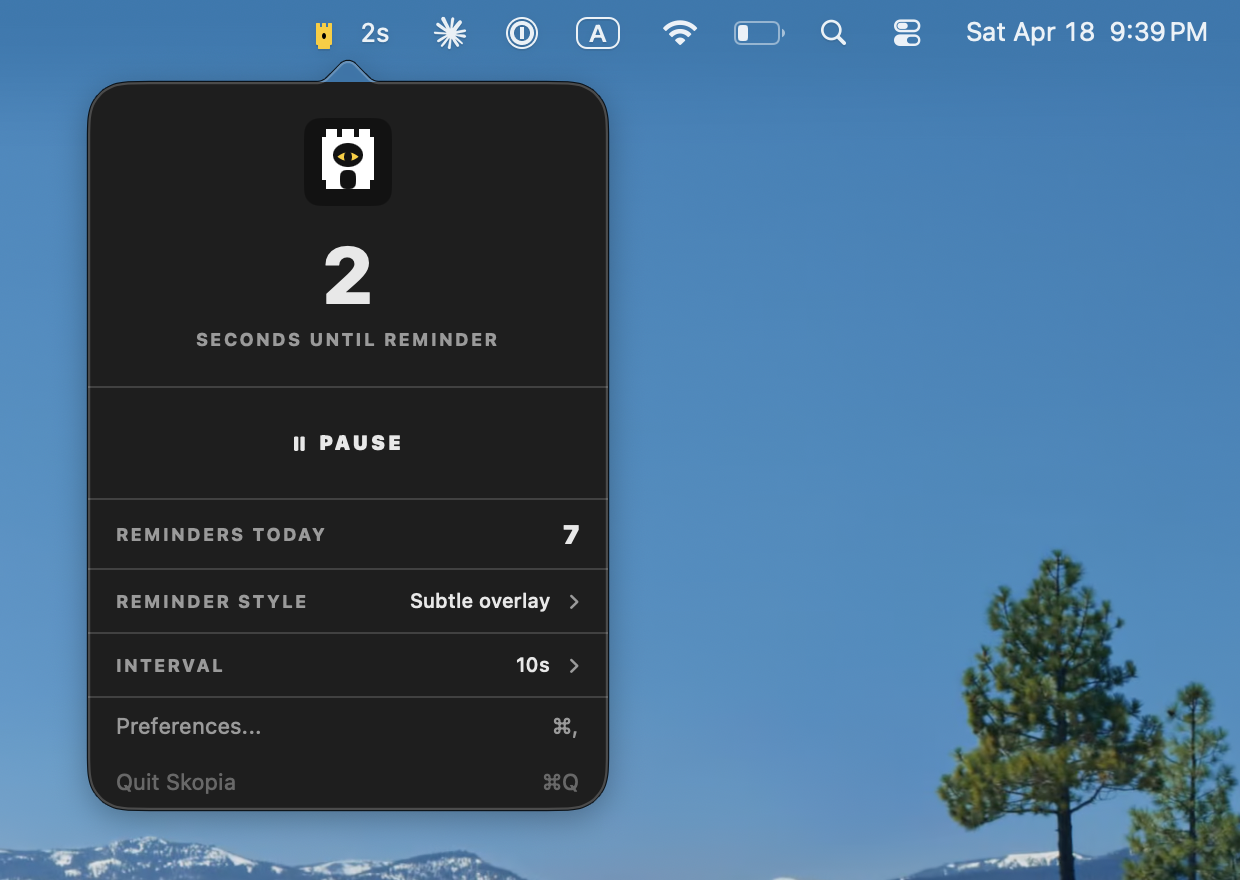
10, 20, 30, or 60 seconds between reminders. Eye care professionals recommend 20 — that's the default.
A subtle cue appears. You blink. It disappears. No clicks, no interruption, no flow break.
Different workflows need different nudges. Switch anytime.
Small floating indicator in the top-right. Best for single-monitor focus work.
A subtle chime. Best with headphones when you don't want your screen touched.
A soft eye crosses your screen. Best for multi-monitor setups where peripheral cues get lost.
A reminder during a client call isn't a reminder. It's an interruption. Skopia stops on its own — and picks up exactly where it left off.
Zoom, Google Meet, Teams, Webex, Slack, Discord, FaceTime, browser calls. A muted mic still counts.
OBS, Loom, QuickTime, CleanShot X, ScreenFlow, Camtasia, Kap — or any app you add yourself.
Anything holding your display awake. Off by default, because tools like Amphetamine hold it permanently.
Name the apps you never want interrupted. Skopia stays quiet whenever one of them is in front.
Any app in full screen on any display. Detected from window geometry, not by watching your screen.
No camera. No Accessibility. No Screen Recording permission. Skopia reads only whether your mic is on — never what it hears.
While a condition holds, your blink reminder and both rest timers freeze — and resume from the frozen value, not from zero. You never lose your place in a 20-20-20 cycle because someone called you.
The menu bar names the active reason. The popover shows a badge. The Pause tab marks it ACTIVE NOW and tells you which app is responsible — so it's never a mystery why Skopia went quiet.
No camera. No analytics. No data leaves your Mac. Ever.
Optional countdown, a reminders-today count, and no dock icon.
Reminders follow your cursor. Works with external displays.
Under 5 MB. No background CPU. Your battery won't notice.
Buy once. Own it forever. No subscription. No trial traps.
When Skopia gets real-time blink detection, you get it free.
⌥⌘P pauses and resumes from any app. No Accessibility permission.
On calls, while recording, in full screen. Timers freeze and resume.
Timer-based reminders are effective. But the honest version of this product knows whether you actually blinked.
Version 2.0 will use Apple's Vision framework to detect blinks in real time — directly on your Mac, without sending anything anywhere. No reminder fires if you blinked. You only get notified when you actually haven't.
Vision framework processes video locally using Apple's neural engine. Skopia will never receive, store, or transmit video data — the same privacy-first principle as v1, extended to the camera.
Pay once. Keep it. Get every update up to v2.0 at no extra cost.
Mac App Store · macOS 13.5 Ventura or later · Lifetime license
Prefer a direct download? Buy on Polar — $4.99 — includes Sparkle auto-updates and works without an Apple ID.
After purchase
You'll be taken to the Mac App Store to complete the purchase. Skopia appears in your menu bar instantly after install.
Your license is tied to your Apple ID — install on any Mac you own, any time.
Questions? [email protected] — we reply within one business day.
No. Skopia is timer-based and never requests camera access. It doesn't ask for Accessibility or Screen Recording permission either — even the automatic pause works without a single permission prompt, because it reads whether your microphone is switched on rather than what passes through it. We're working on Version 2.0 which will add optional on-device blink detection using the Vision framework — all processing happens locally, no video ever leaves your Mac. And it will be a free upgrade.
No measurable impact. Skopia is a small Swift app that runs a single timer. No video, no networking, no continuous processing. You'd need sensitive measurement tools to detect it.
Most free blink reminders are either abandoned, visually loud, or demand permissions they don't need. Skopia is actively maintained, privacy-first, and designed to disappear into your workflow rather than interrupt it. If you don't value that, a free tool might work for you — no hard feelings.
Yes. Since v1.1 the reminder appears on whichever display your cursor is on, so it follows you between screens instead of sitting on the main monitor. For multi-monitor setups we still recommend the "Eye in Center" style — it's large enough to catch peripheral vision across displays.
Yes. Since v1.2 Skopia pauses itself in five situations: when your microphone is in use for a call, when a screen recorder is running, when something is holding your display awake for video, when one of your own deep-focus apps is in front, and when any app is in full screen. Each one is a separate switch in the Pause tab. Your countdown and both rest timers freeze and resume from where they stopped — nothing resets.
It asks CoreAudio whether an input device is currently running. That is a system property, not an audio stream — Skopia never opens the microphone and never hears anything. On macOS 14.4 and later the same property also reports which app is using it, which is how the Pause tab can name Zoom or Teams by name.
Active development. We don't ship dates we can't guarantee, but v2.0 is the next major milestone. Anyone who buys Skopia today gets v2.0 as a free upgrade.
Email [email protected] within 30 days of purchase and we'll refund you. No form, no questions — just "refund please" is enough.
macOS 13.5 (Ventura) or later. Both Apple Silicon and Intel Macs supported. Around 5 MB of disk space.
Yes. Your purchase covers any Mac you personally own or use for work. We trust you.
Your eyes are worth $4.99.
Lifetime license · No subscription · 30-day guarantee
An honest comparison of every blink reminder on macOS, Skopia included.
Every macOS display setting recommended for tired eyes, and which are worth changing.
What peer-reviewed research says actually works — and what is oversold.
Stop noticing your dry eyes at 6pm. Start blinking on schedule.
Get Skopia — $4.9930-day money-back guarantee · macOS 13.5+